


If you run a small business, your website often makes the first impression before a call or visit happens. When it’s modern—fast, mobile-first, and built with clear SEO structure—you earn trust quicker and show up for high-intent searches. You also reduce bounce rates with better UX and turn traffic into leads with focused calls to action. The problem is, most sites fail in a few predictable places, and they’re costing you customers right now.
Key Takeaways
- A modern website builds instant credibility with professional design, clear navigation, and trust cues like reviews, certifications, and guarantees.
- Fast, mobile-first pages reduce bounce rates and improve user experience, since over half of web traffic comes from mobile devices.
- Strong SEO structure (keywords, schema, FAQs, clean architecture) helps Google understand your business and improves rankings and visibility.
- It generates leads 24/7 with tap-to-call, forms, chat, scheduling, and clear service, pricing, and FAQ pages that reduce friction.
- Analytics and tracking (GA4, Search Console, UTMs, conversion events) connect website actions to ROI, improving marketing decisions and revenue.
What Makes a Small Business Website “Modern” Today?
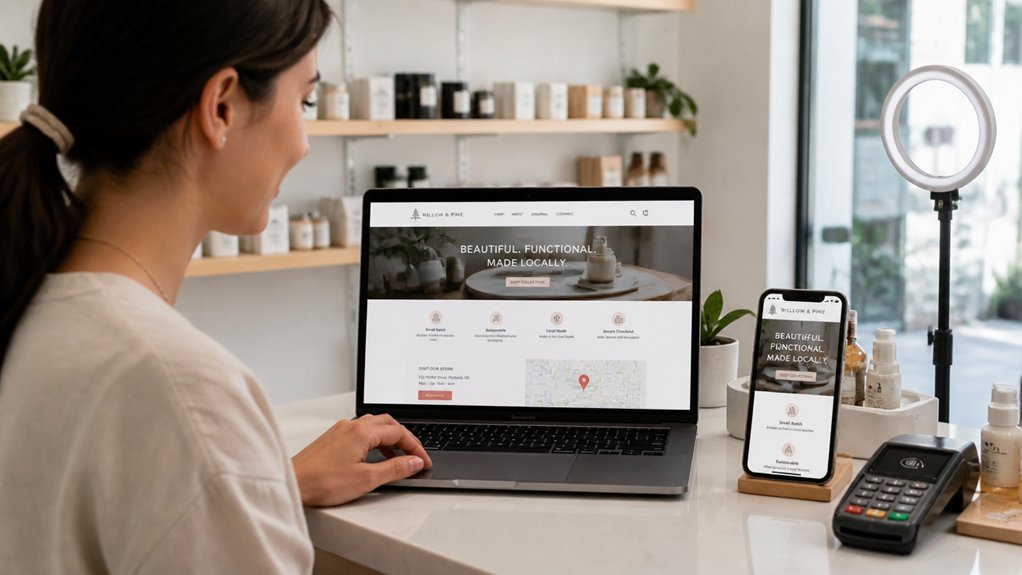
Although design trends change fast, a “modern” small business website today is defined by measurable performance and user experience: it loads in under a few seconds, works flawlessly on mobile, meets basic accessibility standards (like readable contrast and keyboard navigation), and guides visitors to clear actions such as calling, booking, or requesting a quote.
You keep pages lightweight, compress images, and use clean code to reduce bounce rates and improve rankings. You structure content with keyword-focused headings, FAQ snippets, and schema so search engines understand your services and location.
You maintain branding consistency across colors, typography, and tone, while using visual storytelling—real photos, short videos, and before/after proof—to explain value fast.
You track conversions with analytics, test CTAs, and refine navigation so users reach answers in fewer clicks.
Why a Modern Website Builds Trust Fast
You build trust in seconds, and a modern small business website earns it with professional design that signals credibility at first glance.
You keep visitors engaged when your site loads fast and works flawlessly on mobile, where most local searches happen.
You protect customers—and your SEO—by running secure, up-to-date technology (HTTPS, current plugins, and reliable hosting) that reduces risk and friction.
Professional Design Signals Credibility
When a potential customer lands on your site, design quality shapes trust in seconds—research from Google shows users form first impressions in about 50 milliseconds. If your layout feels dated or chaotic, they’ll assume your service is, too, and they’ll bounce before reading a single line.
Professional design signals credibility through clear hierarchy, readable typography, and intuitive navigation that helps visitors find answers fast. Keep branding consistency across colors, logos, and tone so people recognize you instantly across search results, ads, and social profiles.
Use visual storytelling—photos, icons, and concise sections—to show outcomes, not just claims. Support key pages with trust cues like reviews, certifications, and guarantees.
Clean design also improves on-page engagement, which can lift dwell time and conversions, turning more organic visitors into qualified leads.
Mobile-Friendly Experience Matters
Since more than half of web traffic now comes from mobile devices, a mobile-friendly experience acts as an instant trust signal: if your site loads fast, fits the screen, and stays easy to tap and read, visitors assume your business runs just as smoothly.
You cut bounce rates when buttons are thumb-sized, forms are short, and key info—hours, location, services—appears upfront.
Mobile UX also supports SEO because search engines prioritize usable, responsive pages, helping you rank for local intent queries.
Keep branding consistency across screen sizes with the same colors, typography, and tone, so you look established everywhere.
Use visual storytelling that adapts: compressed images, clear headings, and scannable sections that guide decisions in seconds.
When mobile feels effortless, you earn trust quickly.
Secure, Up-To-Date Technology
Although design gets most of the attention, secure, up-to-date technology often determines whether a visitor trusts your business enough to take action.
When your site runs on current frameworks, patches install fast, pages load reliably, and errors drop—signals users read as professionalism. You protect forms, logins, and checkout with Cybersecurity protocols like HTTPS, WAF rules, MFA for admin access, and routine vulnerability scans.
You also use data encryption in transit and at rest to reduce breach risk and reassure customers sharing emails, phone numbers, or payment details.
Modern stacks improve SEO, too: better Core Web Vitals, fewer malware flags, and cleaner crawl paths. Keep plugins minimal, monitor uptime, and back up automatically, so trust doesn’t break when traffic spikes.
Why Your Website Must Be Mobile-First
Even if your desktop site looks polished, a mobile-first approach decides whether visitors stay or bounce, because most web traffic now comes from smartphones and Google primarily uses mobile content for indexing and ranking. If your mobile experience feels cramped or incomplete, you’ll lose visibility and leads.
Design for thumbs first: clear hierarchy, readable type, and tap-friendly buttons that guide calls, directions, and bookings. Keep branding consistency so logos, colors, and trust signals match across screens, reinforcing recognition.
Align your content strategy to mobile intent—people want quick answers, hours, pricing, and proof. Use structured headings and concise copy so Google and customers can scan fast.
When your mobile pages mirror your best desktop content, you protect rankings and convert local searches into real customers.
Speed and UX Fixes That Keep Customers

You lose customers when your mobile pages load slowly, so you’ve got to prioritize mobile-first loading speed with compressed images, lean code, and fast hosting.
You also keep more buyers moving when you streamline navigation paths—clear menus, prominent calls-to-action, and fewer clicks to key pages like Services, Pricing, and Contact.
These speed and UX fixes improve engagement metrics and conversion rates, sending stronger quality signals to search engines.
Mobile-First Loading Speed
When a mobile page takes more than three seconds to load, most visitors won’t wait—they’ll bounce, and your rankings and conversions can drop with them. You can’t afford that on small-business margins, especially as Google weighs Core Web Vitals like LCP and INP for real users.
Start by compressing images, serving next-gen formats, and lazy-loading below-the-fold media. Minify CSS/JS, remove unused scripts, and defer noncritical code so taps feel instant. Use caching and a CDN to cut latency, and preconnect to key third parties.
Measure with PageSpeed Insights and Search Console, then fix the biggest offenders first. Fast pages also support heavier features like Augmented Reality previews without stalling, and they help Voice Search users get answers quickly. Every saved second increases trust and revenue.
Streamlined Navigation Paths
Because every extra click adds friction and delay, streamlined navigation paths keep customers moving from search result to checkout without dropping off. You should aim for a “3-click” journey: home to category to product to purchase, with clear labels that match high-intent keywords (e.g., “Book Now,” “Get a Quote,” “Order Online”).
Use sticky headers, prominent search, and breadcrumb trails so visitors never feel lost.
Cut page weight in menus by limiting top-level items to 5–7 and prioritizing your highest-converting pages. Add interactive elements like filter chips, quick-add buttons, and autosuggest search to reduce taps and speed decisions.
Support visual storytelling with scannable icons, product thumbnails, and trust badges near CTAs, boosting engagement and conversions while improving SEO signals like dwell time.
Website Features Customers Expect in 2026
As customer expectations keep rising, your small business website in 2026 has to deliver speed, trust, and convenience in seconds—not minutes. You’ll need Core Web Vitals-grade performance, mobile-first layouts, and accessible design that works for every visitor.
Add frictionless contact options: tap-to-call, one-click directions, and instant form autofill.
Customers also expect transparent proof: real-time reviews, verified badges, clear pricing, and secure checkout with modern wallets. Use AI-assisted chat for quick answers, but keep an easy path to a human.
Personalize content by intent (new vs. returning visitors) to lift user engagement, while maintaining branding consistency across pages, emails, and booking flows.
Include privacy-forward consent controls, fast media, and error-free analytics so you can improve every journey.
How a Modern Website Helps You Rank on Google

Even if you’re in a competitive market, a modern website gives Google clear, machine-readable signals that you’re the best result for a searcher. You do that with clean site architecture, schema markup, and fast Core Web Vitals, which improve crawl efficiency and reduce bounce signals tied to poor UX.
You also rank higher when your pages match intent. Publish focused service pages, FAQs, and location content, then reinforce relevance with internal links and descriptive headings. Use Content personalization to surface the right page paths based on visitor needs, increasing engagement metrics Google correlates with satisfaction.
Finally, consistent brand storytelling strengthens topical authority across your About, case studies, and blog, earning natural backlinks and branded searches. Add accessible design and mobile-first layouts, and you’ll capture more long-tail queries reliably.
How Your Website Can Sell for You 24/7
While you’re sleeping, your website can qualify leads, answer objections, and push ready buyers to take action. Clear pages, fast load times, and mobile-first design reduce friction and keep visitors moving toward a call, booking, or purchase.
When your services, pricing ranges, and FAQs are easy to scan, you shorten decision time and win higher-intent clicks from search.
You can sell 24/7 by pairing SEO-focused content with customer engagement tools like chat, scheduling, and downloadable guides. Strong brand storytelling builds trust at every step: show proof, explain your process, and highlight outcomes with testimonials and case studies.
Add location and service keywords naturally, so the right people find you, then give them one obvious next step to take today.
How to Track Leads and ROI From Your Website
If you can’t tie website activity to real inquiries and revenue, you’re guessing at what’s working. Start with GA4 and Search Console to see which pages drive organic visits, clicks, and calls.
Add UTM tags to every email, social, and ad link so you can attribute leads to specific campaigns and keywords.
Track form submissions, phone clicks, and chat starts as conversions, then pass each lead into your CRM to log source, stage, and closed revenue.
Calculate ROI by comparing revenue per source to your content, SEO, and ad costs.
Use heatmaps to spot friction and improve UX on high-intent pages.
Pair Customer testimonials with branding consistency to lift trust and conversion rates across funnels.
DIY vs Hiring a Small Business Web Designer
Before you pick a platform or theme, decide whether you’ll build the site yourself or hire a small business web designer, because that choice directly affects your launch speed, search visibility, and lead conversion rate.
DIY can cut upfront costs, but you’ll spend hours on setup, mobile fixes, and SEO basics like indexing, redirects, and Core Web Vitals. If you skip structured pages, you’ll weaken your content strategy and rank for fewer local searches.
Hiring a designer costs more, yet you get clearer IA, faster load times, and cleaner analytics tracking. You’ll also protect branding consistency with scalable components, not one-off templates.
A pro can build conversion paths—calls, forms, and reviews—so visitors act. Choose DIY if you can test, measure, and iterate weekly; hire if leads can’t wait.
Conclusion
A modern website isn’t optional—you need it to earn trust, rank on Google, and convert visitors into leads. When your site loads in under 2 seconds, looks great on mobile, and answers key questions fast, you reduce bounce rates and increase inquiries. Add SEO basics, clear CTAs, and tracking, and you’ll see exactly what drives ROI. Think of your website as a 24/7 storefront: clean, fast, and built to sell.